


Telestream ScreenFlow 10 Screen Recording and Editing Software for Mac
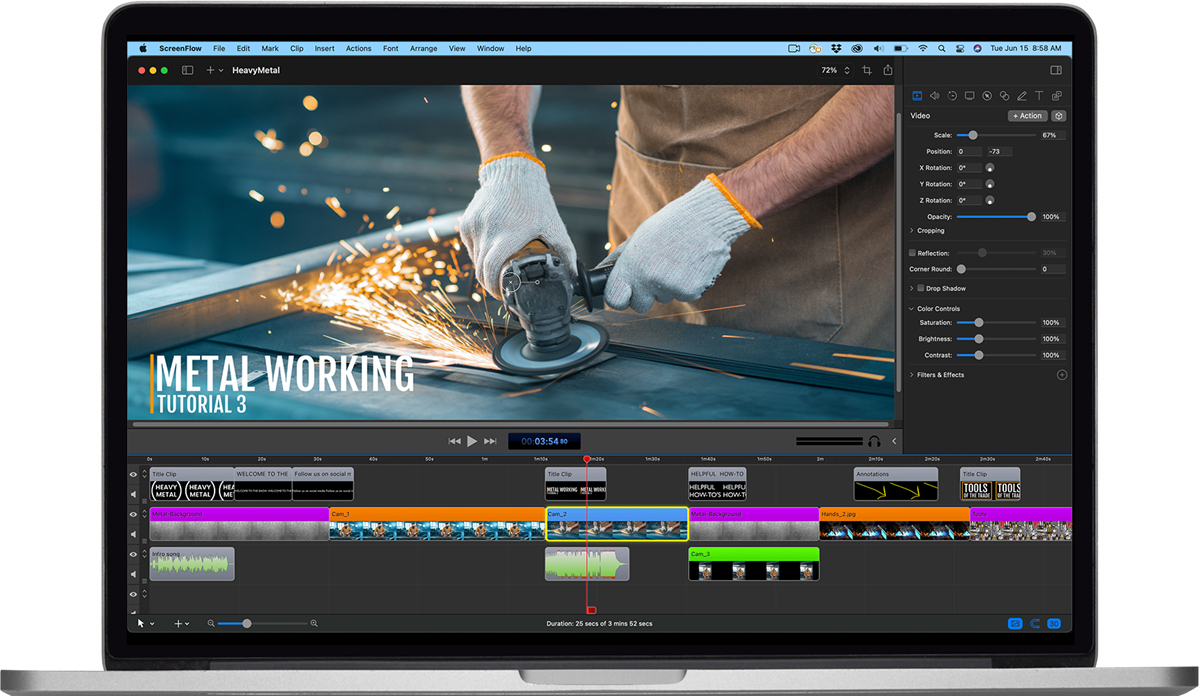
ScreenFlow 10 records the Mac screen, the camera, the microphone, and system audio, then drops all of it onto a multi-track timeline for editing in the same application. Version 10 records computer audio natively, with no extra audio driver to install, and can capture each application's audio on its own track. Capture is selective: record a screen region, limit the recording to specific applications, or exclude an application from it entirely. It will also record a connected iPhone or iPad screen.
The headline addition in version 10 is an automatic Background Removal filter driven by machine learning and tuned for the Apple M1 Neural Engine, so a camera insert can be cut out without a green screen. A closed-caption editor adds, edits, and burns in ADA-compliant subtitles, and finished projects publish straight to YouTube, Vimeo, and Imgur. Telestream measured camera recordings up to 250 percent smaller than ScreenFlow 9 at the same quality, roughly 75 percent less CPU while recording, and thumbnail creation up to 300 percent faster. It runs on Apple silicon and 64-bit Intel Macs under macOS Catalina 10.15 or Big Sur 11. Upgrade SKUs are priced by the version you are coming from.
| Product Type | Screen recording and video editing software |
|---|---|
| Platform | macOS only, Apple silicon and 64-bit Intel |
| Operating System | macOS Catalina 10.15 or Big Sur 11 |
| Minimum RAM | 4 GB |
| Disk Space | 20 GB |
| Audio Capture | Native system audio, no driver install; per-application audio tracks |
| Notable Tools | ML Background Removal, closed-caption editor, iOS screen recording |
| Publishing | YouTube, Vimeo, Imgur |