


Crestron AirMedia AM-TX3-100 or AM-TX3-200
Both send a laptop's screen to an AirMedia Series 3 receiver over Wi-Fi 6 at up to 2160p30. The AM-TX3-100 is a small adaptor on a USB-C cable. The AM-TX3-200 is a desktop endpoint that also takes HDMI, connects by Ethernet with PoE, and handles wireless conferencing with a Series 3 receiver.
Side by Side
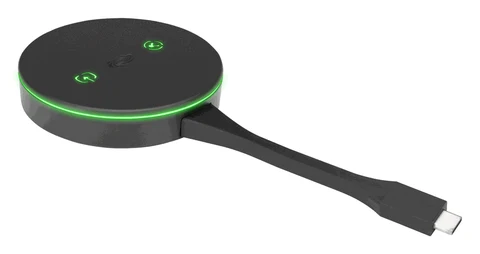
Specs
- Laptop connection
- USB-C (DisplayPort Alt Mode)
- Maximum resolution
- 3840 x 2160 at 30 Hz
- Wi-Fi
- Dual-band Wi-Fi 6, up to 70 ft
- Ethernet
- None
- Power
- From the laptop's USB-C or the optional power pack
- Power draw
- 2.5 W typical
- Size and weight
- 7 in. long with cable, 90 g
- Receivers
- AM-3000-WF, AM-3100-WF, AM-3200-WF
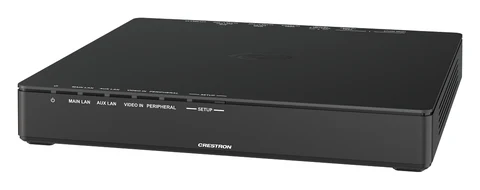
Specs
- Laptop connection
- USB-C (DisplayPort Alt Mode) or HDMI
- Maximum resolution
- 3840 x 2160 at 30 Hz
- Wi-Fi
- Dual-band Wi-Fi 6, up to 70 ft
- Ethernet
- 100/1000 Mbps, PoE powered, PoE+ aux port
- Power
- USB-C, PoE or optional 24 V power pack
- Power draw
- 4 W idle, 12.5 W in use
- Size and weight
- 200 x 180 x 30 mm, 597 g
- Receivers
- AirMedia Series 3 receivers
What Matters
Laptops with a USB-C port that carries DisplayPort Alt Mode: plug in, press the screenshare button. It can run on power from the laptop's USB-C port.
A table position that has to take HDMI laptops as well as USB-C, sit on the wired network with PoE, or run wireless conferencing with an AirMedia Series 3 receiver.
Questions
An AirMedia Series 3 Connect adaptor: it plugs into a laptop's USB-C port and sends the screen over Wi-Fi 6 to an AM-3000-WF, AM-3100-WF or AM-3200-WF receiver, at up to 2160p30.
No. It needs a USB-C port with DisplayPort Alt Mode. The AM-TX3-200 has an HDMI input as well as USB-C.
Questions? Talk to a Person.
Call (201) 791-1400 or email [email protected] - we've handled pro audio & video since 1988.