


USB-C and HDMI Switchers for BYOD Meeting Rooms
A bring-your-own-device room has to take whatever laptop walks in. That means a USB-C input that carries video and charges the laptop, an HDMI input for everything else, and a switch that picks the active source without a technician. The harder question is the camera and microphone: either the switcher passes them to whichever laptop is active, or a separate USB switch does.
The 5 Picks
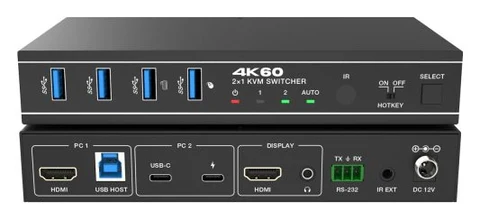
Specs
- Inputs
- 1 HDMI, 1 USB-C
- USB-C
- DP 1.4 Alt Mode, 4K60, up to 100 W charging
- USB
- 4 USB 3.0 device ports
- Control
- RS-232, IR, CEC, front panel
- Video
- Supports Ultra-wide screen & resolutions up to 4K@60Hz or 2K@60Hz/144Hz
- Use it for
- A two-input switcher with a hotkey to flip between the room PC and a visitor laptop. A hotkey lets a presenter change source without menus.
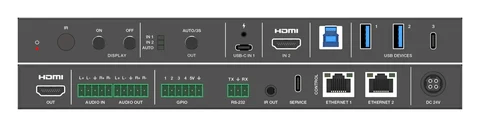
Specs
- Inputs
- 1 HDMI, 1 USB-C
- USB-C
- 4K60 4:4:4, up to 100 W charging
- USB
- USB 3.2 Gen 1 host and local hub
- Control
- Front panel, RS-232, TCP/IP, web GUI, CEC
- Use it for
- A 2x1 with a USB host and device ports, so a room camera and microphone follow the active laptop.
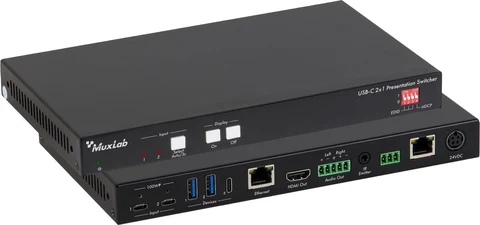
Specs
- Inputs
- 2 USB-C
- USB-C
- Up to 100 W charging
- Control
- Front panel, RS-232, TCP/IP
- Video
- 4K60 4:4:4, HDR10, HDCP 2.2
- Use it for
- Two USB-C inputs to one HDMI output with auto switching, for rooms where every guest has USB-C. It has no HDMI input, so it only suits those rooms.
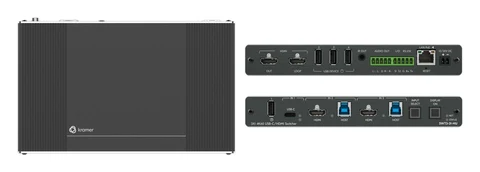
Specs
- Inputs
- 1 USB-C, 2 HDMI
- USB
- USB 3.2 Gen 2, 3 hosts and 4 USB-A device ports
- Control
- RS-232, Ethernet with PoE, GPIO, IR, CEC
- Video
- Max Data Rate: 18Gbps bandwidth (6Gbps per graphic channel); Max Resolution: 4K@60Hz (4:4:4) resolution; Content Protection: HDCP 2.3; HDMI Support: Deep Color, 3D, HDR as specified in HDMI 2.0b
- Notable
- Outputs: HDMI, HDMI loop, balanced stereo audio
- Use it for
- Three sources with USB peripherals switched together with the video, plus a loop output for a second display. Switching the peripherals with the video means no separate USB switch is needed.
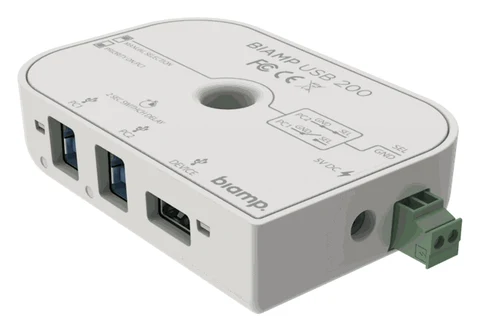
Specs
- Notable
- Hosts: 2 USB 3.0 Type-B; Device: 1 USB 3.0 Type-A; Modes: Priority or manual via control system; Reach: USB 3.0 to 10 ft, USB 2.0 to 17 ft each side
- Use it for
- Moves a camera or USB codec between the room computer and a laptop when video already runs through another switcher.
What Matters
One USB-C cable can carry DisplayPort video, data and power. The DVDO, KanexPro and MuxLab units list up to 100 W of charging on the USB-C input. The Kramer SWT3-31-HU lists up to 60 W. The DVDO needs its charge port powered by an external adapter, the KanexPro its 24 V supply and the Kramer its 20 V supply. The listed wattage depends on that supply being connected.
The DVDO PS-21 has four USB 3.0 device ports shared by both inputs. The KanexPro COL-HUD-21 has a USB host port and a local hub, and the Kramer SWT3-31-HU switches its USB devices together with the video source. If the video runs through a switcher without USB, a USB-only switch such as the Biamp USB 200 moves a camera or soundbar between two computers. A room camera and microphone belong to whichever laptop is presenting, so they have to move with the video.
In auto mode the MuxLab 500531 selects the first detected source. The KanexPro COL-HUD-21 switches on signal and 5 V detection, and it switches USB with the active video by default. The Biamp USB 200 has a priority mode that switches when a second computer connects, and a manual mode for a control system. Auto mode matters in a BYOD room because the next guest can plug in without anyone touching the switcher.
All four presentation switchers list RS-232 control, and the KanexPro, MuxLab and Kramer add network control. The KanexPro COL-HUD-21, MuxLab 500531 and Kramer SWT3-31-HU send HDMI audio to a balanced analog output for a DSP or amplifier. The DVDO PS-21 has a separate analog audio output. Control lets a room system change inputs, and a balanced output carries the audio to a DSP over a cable that resists noise.
The DVDO, KanexPro, MuxLab and Kramer units list 4K at 60 Hz. The KanexPro, MuxLab and Kramer list 4:4:4 color. Full 4:4:4 color keeps colored text and thin lines sharp.
Questions
For a small room that needs a laptop input and a room PC, a 2x1 such as the DVDO USBC-HDMI-PS-21 or KanexPro COL-HUD-21 covers it. Two inputs are all that room needs. For three sources with USB peripherals switched together, the Kramer SWT3-31-HU is the larger option here. It adds a third input and a loop output.
Yes on these units. The DVDO, KanexPro and MuxLab list up to 100 W and the Kramer up to 60 W, each with its own power supply connected. A laptop on a long meeting stays charged instead of running down on the table.
Only if the video switcher does not carry USB. Otherwise the camera and microphone stay with one computer. The DVDO, KanexPro and Kramer switchers include USB device ports. The Biamp USB 200 switches a USB device between two computers on its own.
Questions? Talk to a Person.
Call (201) 791-1400 or email [email protected] - we've handled pro audio & video since 1988.