


Shop all NewTek
NewTek TriCaster Mini Control Surface
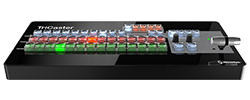
The Mini Control Surface gives a TriCaster Mini operator physical control of the live production, with a layout mapped directly to the TriCaster Mini live desktop. Large backlit buttons and a premium T-Bar replace mouse clicks for switching, transitions, and effects.
The compact panel sits alongside the Mini system and drives switching, keying, and DVE moves by hand, keeping the operator's attention on the show rather than the interface. Its low-profile design fits the same desk or flypack as the switcher it controls.
| Type | Hardware control surface for TriCaster Mini |
|---|---|
| Layout | Mapped to the TriCaster Mini live desktop |
| Buttons | Large, backlit |
| T-Bar | Premium T-Bar for transitions |
| Design | Compact, low-profile |
| Compatibility | TriCaster Mini systems |